What It Is and Key Specs
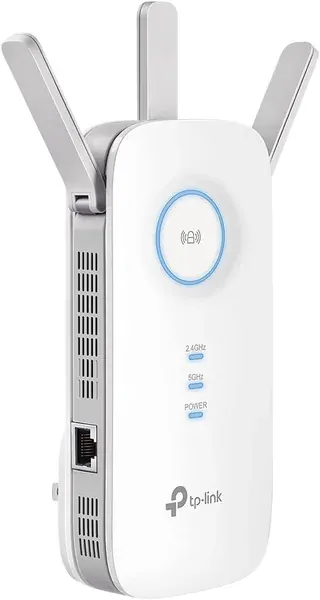
The TP-Link RE550 is a plug-in, dual-band WiFi 5 (802.11ac) range extender built around an AC1900 radio configuration: up to 1,300 Mbps on the 5 GHz band and up to 600 Mbps on 2.4 GHz, for a combined theoretical 1.9 Gbps. According to the manufacturer, three adjustable external antennas push usable coverage to roughly 2,100 sq. Ft. And support up to 32 simultaneous devices.
Beyond wireless, the RE550 includes a single gigabit Ethernet port that serves double duty: it can hard-wire a high-priority device — smart TV, game console, desktop PC — directly to the extender, or it can be used to run the unit in Access Point (AP) mode, turning a wired drop into a wireless hotspot. Dimensions are 163 × 76.4 × 66.5 mm (6.4 × 3.0 × 2.6 in), and the unit is designed for wall-outlet mounting, per published third-party coverage from BikmanTech.
Setup is handled through the Tether app or a standard browser interface. The RE550 is also EasyMesh-compatible, meaning it can slot into a unified mesh network alongside any EasyMesh-supporting router rather than broadcasting a separate SSID.
Build Quality and Safety
The three external antennas are adjustable, which allows some physical tuning for coverage direction — a practical detail in real-world deployments where furniture and walls create uneven signal paths. The wall-plug design keeps cabling minimal but does mean the unit protrudes from the outlet; BikmanTech notes its size is "worth noting" for confined spaces.
No CPSC recalls are on record for TP-Link products of this type as of 2026-07-24 (
saferproducts.gov). On the security side, TP-Link states the RE550 is designed under its commitment as a signatory of the U.S. Cybersecurity and Infrastructure Security Agency's (CISA) Secure-by-Design pledge, with advanced security described as a core design requirement.
Real-World Fit — Who It Suits, Who Should Skip
Published coverage from MiniPCReviewer describes the RE550 as a "solid dual-band AC1900 extender" capable of meaningful dead-zone reduction in typical home environments. Smart Adaptive Roaming enables automatic band and signal handoffs as users move through the home, reducing the need to manually switch networks — a meaningful convenience in multi-story or long-footprint homes.
The gigabit Ethernet port is a genuine differentiator at this extender tier: MiniPCReviewer notes it allows hard-wiring of high-priority devices for lower latency, which range extenders without a wired port cannot offer.
Good fit for: Renters or homeowners who cannot run new Ethernet cable but want to push coverage into a back bedroom, garage, or basement; anyone needing a wired drop at the far end of their home; users with an EasyMesh-compatible router seeking a seamless single-SSID expansion.
Consider skipping if: You already run a dedicated mesh system — TP-Link explicitly notes the RE550 is not compatible with mesh systems like Deco. Users who require maximum throughput rather than coverage extension should also reconsider; the manufacturer's own listing states that wireless extenders are designed to improve coverage, not increase speeds.
Honest Limitations
TP-Link's own feature bullets include a candid disclosure that deserves emphasis: actual speeds through the extender will be 50% or less of current speeds. This is an inherent constraint of the repeater architecture, not a product-specific defect, but buyers expecting a speed boost will be disappointed.
Community forum threads on TP-Link's own support site document connectivity edge cases — including at least one instance where a laptop required a driver reinstall before successfully associating with the RE550, and separate reports of units failing to join a network until power-cycled. These suggest setup can occasionally require troubleshooting beyond the standard app flow, particularly with certain device drivers or network configurations.
The EasyMesh compatibility, while useful, carries a firm ceiling: it works only with EasyMesh-capable routers and is entirely separate from TP-Link's own Deco mesh ecosystem, which may create confusion for buyers already invested in that platform.
How It Sits in the Extender Category
Within the AC1900 extender segment, the RE550's combination of tri-antenna design, gigabit Ethernet, EasyMesh support, and AP mode represents a feature set toward the upper end of traditional range extenders — without stepping into the price and complexity of a true mesh node. For households where a plug-in extender is the right tool, those hardware additions meaningfully widen its utility compared to single-band or Ethernet-less alternatives.
Darrell Steward
1 Feb, 2021Brilliant
This is the best product that has ever been made. It is also one of the best items in the world right now. Definitely go for it.
Albert Flores
17 Oct, 2020Just WOW
It's good to use this product for development as it has very good performance, display quality and all other features.