LuvemHome

Expert Home Product Reviews

​
​
LuvemHome

Expert home product reviews for furniture, appliances, lighting, smart home, and more

Company
AboutPrivacy PolicyTerms of UseAffiliate Disclosure
Home Products
All ReviewsNew ReleasesTop Rated
Explore
FurnitureAppliancesLightingSmart HomeDecorHome Storage
Our Network
LuvemHome
LuvemBooks
LuvemPets

© 2026 LuvemHome. All rights reserved.

Built by capNotion

  1. Home
  2. Product Reviews
  3. Smart Home
  4. Amazon eero 6 mesh wifi add-on extender

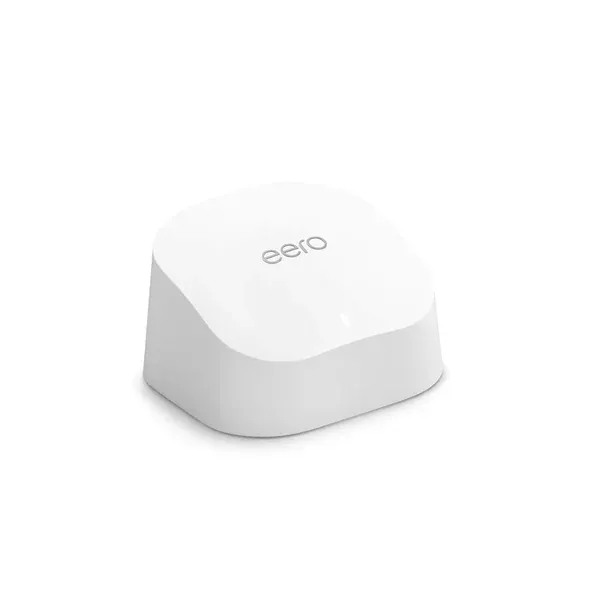
Amazon eero 6 mesh wifi add-on extender - Add up to 1,500 sq. ft. of Wi-Fi 6 coverage. Required eero mesh wifi system not included by Amazon
HOME

eero 6 Extender Review: Expand Your Mesh Network

·

6 min read

$79.99 on Amazon
Reviewed by

LuvemHome

·

Jun 9, 2026

The Amazon eero 6 mesh WiFi add-on extender delivers reliable Wi-Fi 6 coverage expansion of up to 1,500 sq. ft. with a setup process that takes under five minutes through the eero app. It's a strong choice for existing eero users looking to eliminate dead zones, though it's locked to the eero ecosystem and full-featured use requires an eero Plus subscription.

Our Review

In This Review
  • Pros & Cons
  • Setup & Compatibility
  • Features & Performance
  • App Experience
  • Privacy & Security
  • The Verdict

Pros & Cons

What We Like
  • Setup takes under 5 minutes via the eero app — no technical knowledge required
  • Adds genuine Wi-Fi 6 support with speeds up to 500 Mbps for everyday streaming and smart home use
  • Includes one Ethernet port for wired device connections or wired backhaul
  • Seamless roaming via TrueMesh means devices hand off between nodes without dropping connections
  • Low power draw (~7 watts) makes it cost-effective to run 24/7
What Could Be Better
  • Requires an existing eero mesh system — completely non-functional as a standalone device
  • Advanced features (parental controls, ad blocking, threat scanning) locked behind ~$9.99/month eero Plus subscription
  • 500 Mbps aggregate throughput won't satisfy users on gigabit internet plans who need full speeds at range
  • No tri-band support — step up to eero Pro 6E if backhaul congestion is a concern in dense device environments
Ready to buy?
$79.99 - Amazon
If dead zones are killing your streaming, video calls, or smart home reliability, the eero 6 add-on extender is one of the cleanest solutions on the market — provided you're already invested in the eero ecosystem. This compact unit promises to push an additional 1,500 square feet of Wi-Fi 6 coverage into the corners of your home with virtually no friction. Here's how it actually performs.
Amazon eero 6 mesh wifi add-on extender - Add up to 1,500 sq. ft. of Wi-Fi 6 coverage. Required eero mesh wifi system not included by Amazon

Setup & Compatibility

Let's get the most important thing out of the way upfront: this extender requires an existing eero mesh WiFi system to function. It is not a standalone router. If you're hoping to use it with a non-eero setup, stop here — it won't work. But if you're already running an eero 6, eero 6+, eero Pro 6, or eero Pro 6E system, setup takes under five minutes.
The process is entirely app-driven. Plug the extender into any standard 120V outlet, open the eero app on iOS or Android, tap "Add eero device," and the system handles the rest. There's no web interface, no complicated SSID matching, no channel selection. The app walks you through placement suggestions based on your existing network topology, which is genuinely helpful for first-time mesh users.
Physically, the unit is small — roughly 3.8 inches square and about an inch thick — so it tucks behind furniture or sits unobtrusively on a shelf without demanding visual real estate. The clean white design with subtle eero branding matches the understated aesthetic of the broader product line. No blinking status lights to distract you after setup; a single small LED indicator tells you what you need to know.
The extender communicates with your eero gateway router over a dual-band connection (2.4 GHz and 5 GHz), automatically selecting the best band for backhaul versus client traffic. For wired backhaul enthusiasts: this model includes one Ethernet port, which lets you connect a nearby device directly or, if you run a cable to it, use a wired backhaul connection for improved throughput.

Features & Performance

The eero 6 extender supports Wi-Fi 6 (802.11ax) with speeds up to 500 Mbps aggregate — adequate for most households but notably slower than the eero Pro 6E, which tops out closer to 2.3 Gbps. For a 1,500 sq. ft. addition to your network coverage, 500 Mbps is genuinely sufficient for 4K streaming, video conferencing, and a moderate density of smart home devices simultaneously.
Where mesh systems like eero genuinely outshine traditional range extenders is seamless roaming. As you move between floors or rooms, your devices hand off automatically without dropping connections or requiring you to manually switch networks. This is particularly valuable if you use voice assistants, smart thermostats, or security cameras that need consistent connectivity.
Band steering and TrueMesh technology — eero's proprietary mesh routing — work behind the scenes to optimize traffic across nodes. In a typical two-story home where the gateway sits in a first-floor living room, adding this extender to a second-floor bedroom or far-end office routinely brings signal quality from marginal to solid.
One honest limitation: if your home exceeds 2,500–3,000 square feet, a single add-on extender likely won't solve coverage comprehensively. You may need two units, or consider upgrading to eero Pro 6E nodes as your base system.

App Experience

The eero app (available on iOS and Android) is one of the more polished router management apps available. The home dashboard shows connected devices, network health, and individual node status at a glance. You can set up profiles for family members, apply content filtering through eero Plus (a subscription add-on at around $9.99/month), and run network speed tests directly from the app.
Device naming and grouping is intuitive — a feature that becomes genuinely useful once you have 20+ smart home devices on your network. The app also notifies you when a node goes offline, which is more helpful than it sounds when troubleshooting.
The one friction point: many advanced features, including ad blocking and parental controls beyond basic scheduling, sit behind the eero Plus paywall. The core functionality is solid without it, but power users may feel the nudge toward a subscription is persistent.

Privacy & Security

eero devices receive automatic security updates pushed through the app — you don't need to manually update firmware, which is a meaningful advantage for maintaining network security without technical oversight. The eero platform uses WPA3 encryption on supported devices and offers an automatic threat scanner through eero Plus.
For households with children or privacy-conscious users, the ability to isolate devices on a guest network and apply profile-level content controls adds a practical layer of management. No certification concerns apply here — this is a consumer networking device, not an appliance with thermal or electrical complexity requiring UL certification scrutiny in the traditional sense.
Power consumption is minimal — the unit draws approximately 7 watts during normal operation, keeping it well within the efficiency range you'd hope for a device running continuously. While eero does not currently advertise ENERGY STAR certification for this specific add-on extender, the low wattage means its annual energy cost is negligible.

The Verdict

The bottom line: the eero 6 add-on extender is the right answer if you already own an eero system and have dead zones to address. It's fast to deploy, genuinely effective for spaces up to 1,500 square feet, and the app experience removes nearly all of the friction that has historically made mesh networking feel complicated. The single Ethernet port adds flexibility that budget extenders rarely offer at this price point.
The meaningful caveats are real but narrow: it only works within the eero ecosystem, advanced features require an ongoing subscription, and throughput won't satisfy users on gigabit+ plans who need every bit of speed at range. For the average household streaming, gaming, and running smart home devices across 2,500–4,000 total square feet, this extender does exactly what it promises.

This post contains affiliate links. We may earn a commission if you purchase through these links at no additional cost to you.

Share This Review
Browse Categories

Smart Home

Popular Reviews
POPULAR
RECENT
TRENDY

Kidde Smart CO Detector: Hardwired Done Right

6/10/2026

ZMISHIBO 52" Fan Review: Silent & Smart

6/10/2026

AROMA CoreCoat Rice Cooker: Built for Brown Rice

6/10/2026