What It Is and Key Specs
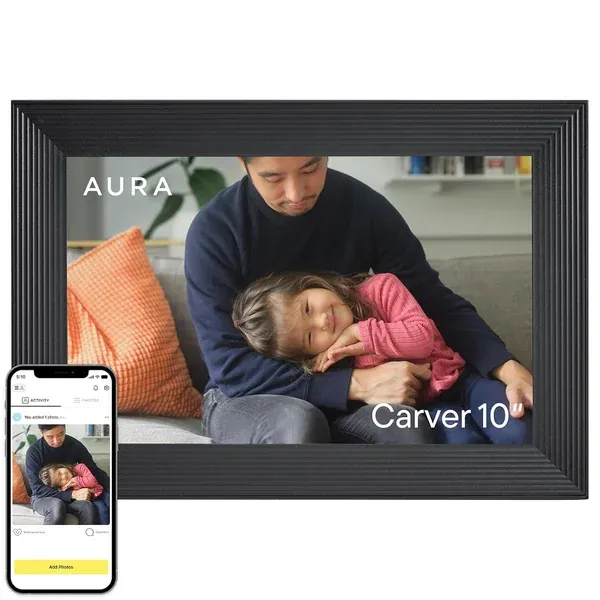
The Aura Carver is a 10.1-inch landscape-orientation digital photo frame that connects to home Wi-Fi and syncs photos and videos through the Aura companion app. According to the manufacturer, the frame offers free unlimited cloud storage with no subscription required, allowing family members to send photos directly from their phones to the frame. The listing highlights auto on/off scheduling and a built-in speaker for video playback. Per the Aura product page and its user manual (
manuals.plus), videos uploaded through the Aura app play automatically as part of the photo slideshow. The Gravel colorway is a neutral, premium-finished option designed to blend with home décor.
Display and Setup
Multiple published sources speak positively to the core viewing experience. Wirecutter (
nytimes.com/wirecutter) named the Aura Carver its top pick for digital photo frames, describing the 10.1-inch display as "sharp, bright, and vivid" and calling setup "simple" in their evaluation. The Spruce (
thespruce.com) echoes this, noting crisp images, multiple display modes, and an easy-to-use app. DPReview (
dpreview.com) characterizes it as a strong contender for households wanting cloud-enabled photo sharing with minimal friction.
Build Quality and Safety
Aura describes the Carver as crafted from premium materials, and published coverage generally supports a well-finished physical product. The user manual (
manuals.plus) advises handling the power cord carefully — avoiding bending, twisting, or placing heavy objects on it — and always unplugging by the plug rather than the cord. For screen care, the manual recommends a soft, lint-free microfiber cloth and warns against abrasive cleaners or sprays (
manuals.plus). Prospective buyers should follow these guidelines to maintain display quality over time.
Real-World Fit: Who It Suits, Who Should Skip
This frame is well-matched to households where multiple family members want to contribute photos remotely — grandparents receiving pictures from adult children, for example, or new parents keeping relatives updated. The no-subscription model and unlimited cloud storage are genuine differentiators in this category. Readers on Amazon agree in large numbers, giving it an aggregate rating of 4.7/5 from 14,655 ratings.
That said, buyers who want granular control over how their photos look may find the frame limiting. PCMag (
pcmag.com) explicitly flags that users cannot adjust picture settings or screen brightness, and that portrait orientation is not supported. For those who already own a capable smart display — or who prefer more hands-on control — PCMag suggests alternatives may serve better. The landscape-only layout is also worth noting for anyone whose photo library skews toward vertically framed portraits.
Honest Limitations
No product is without trade-offs, and the Aura Carver has several worth weighing:
- No manual picture or brightness adjustment. As noted by PCMag (pcmag.com), the frame lacks controls for display calibration or brightness, which can matter in rooms with varying light conditions.
- No portrait mode. The landscape-only display is a hard constraint that some users will find restrictive.
- Software and connectivity fragility. History Tools (historytools.org) aggregates user-reported concerns about software updates introducing glitches, hardware defects, and network instability. Aura's own help center (help.auraframes.com) maintains a troubleshooting section that includes issues such as reboot loops, suggesting these are known enough to warrant documented guidance.
- Premium price point. This frame is positioned at the higher end of the consumer digital frame market. Buyers should weigh the convenience features against alternatives at lower price points.
How It Compares
Within the digital frame category, Wirecutter's pick of the Aura Carver as its top recommendation (
nytimes.com/wirecutter) reflects a consensus that its display quality and sharing ecosystem stand out. However, PCMag's more critical take serves as a useful counterweight, particularly for buyers who prioritize flexibility over simplicity. The Carver is purpose-built for easy, passive photo sharing — not for users who want a feature-rich, configurable smart display.
Bottom Line
The Aura Carver 10" delivers on its core promise: a good-looking, easy-to-use frame that makes sharing photos across a family genuinely simple. The unlimited cloud storage and no-subscription model are meaningful advantages. The trade-offs — limited display customization, landscape-only orientation, and reported software reliability concerns — are real and should inform the purchase decision. Readers' aggregate enthusiasm (4.7/5 from over 14,600 Amazon ratings) reflects strong satisfaction for its intended use case, but informed buyers will want to go in with clear expectations.
This review synthesizes the product listing, manufacturer documentation, and published editorial coverage from sources including Wirecutter, DPReview, The Spruce, and PCMag.
Darrell Steward
1 Feb, 2021Brilliant
This is the best product that has ever been made. It is also one of the best items in the world right now. Definitely go for it.
Albert Flores
17 Oct, 2020Just WOW
It's good to use this product for development as it has very good performance, display quality and all other features.