What It Is and Key Specs
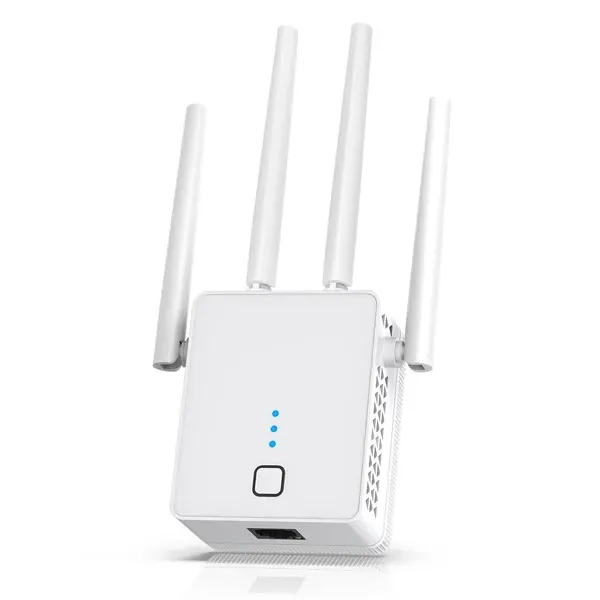
The Nonser WiFi Extender is a dual-band wireless range extender rated at a combined 1200Mbps (split across 2.4GHz and 5GHz bands). According to the manufacturer listing, it ships with four external antennas and claims coverage of up to 15,999 sq. Ft., with support for 105 or more simultaneous devices. It operates in three modes — WiFi repeater, access point (AP), and wired Ethernet bridge — and includes a physical Ethernet port. Security is handled via WPA/WPA2 protocols. The listing describes setup as broadly compatible with existing routers and "hassle-free," though no specific setup app or web interface details are provided.
Build Quality and Safety
The manufacturer listing does not specify materials, internal chipsets, or FCC/CE certification details, so build-quality assessments are limited to what is publicly disclosed. The four-antenna form factor is consistent with mid-range extenders in this category, though antenna count alone does not determine real-world throughput. On the safety front, as of July 24, 2026, there are no CPSC recalls on record for WiFi products of this type, according to the U.S. Consumer Product Safety Commission's SaferProducts.gov database.
The headline figures — 15,999 sq. Ft. And 105+ devices — warrant some context. Coverage claims on extender listings are typically measured under ideal, open-space lab conditions and rarely reflect real-world performance in homes with walls, floors, and interference. Consumer Reports notes that throughput and range are best evaluated at multiple distances from the router, including far-range positions where performance typically drops significantly. Independent review outlets such as Wirecutter and PCMag consistently find that the Wi-Fi 5 (802.11ac) dual-band extender category — which is where a 1200Mbps device like this sits — performs adequately for moderate household use but is outpaced by Wi-Fi 6 models like the TP-Link RE715X for demanding multi-device households, according to PCMag's rankings. The Nonser listing does not specify Wi-Fi 6 (802.11ax) support, so buyers should treat it as a Wi-Fi 5 device unless confirmed otherwise.
The 1200Mbps combined throughput figure is a theoretical ceiling divided between both bands; real-world single-band speeds will be a fraction of that number, a pattern common across this tier of extenders.
Three Work Modes: Where the Flexibility Lies
One genuine practical advantage called out in the manufacturer listing is the three-mode operation. As a repeater, it rebroadcasts an existing WiFi signal further into the home. In AP mode, connected to a router via Ethernet, it can create a new wireless access point — often a more reliable configuration than pure wireless repeat mode, since it avoids the bandwidth halving that repeaters typically impose. The built-in Ethernet port also allows wired backhaul or wired device connection, adding versatility that not every entry-level extender provides.
Real-World Fit: Who It Suits and Who Should Skip It
This extender is a reasonable consideration for renters or homeowners who have a handful of dead-zone rooms and want a plug-in fix without replacing their router. The WPA/WPA2 security support and broad router compatibility lower the barrier to setup. It may suit light to moderate users — email, standard-definition or HD streaming, casual browsing — in areas that are close enough to benefit from the extended signal.
Buyers should think carefully before purchasing if they: have a very large home with thick concrete or brick walls (where even the advertised range will compress sharply); need Wi-Fi 6 performance for dense device environments; or run consistently high-bandwidth applications like 4K multi-room streaming or competitive online gaming. Wirecutter's extender guide notes that users with those needs are often better served by upgrading router hardware or moving to a mesh system. Additionally, category-level experience — documented in community forums and support pages from extender manufacturers — shows that extenders as a class can require periodic reboots, firmware updates, and careful placement to maintain stable connections, so buyers should factor in some ongoing management.
Honest Limitations
- The 15,999 sq. Ft. Coverage claim is a manufacturer-stated maximum under ideal conditions and is unlikely to be achievable in a typical furnished home.
- No independent lab test results for this specific model are available in published sources reviewed here.
- WPA/WPA2 security is functional but does not include the newer WPA3 standard, which is increasingly common on 2025–2026 hardware.
- The listing does not disclose Wi-Fi generation (Wi-Fi 5 vs. Wi-Fi 6), which matters for future-proofing.
- Repeater mode, by its nature, typically halves available bandwidth on the extended network — a limitation common across this entire product category, not unique to Nonser.
Darrell Steward
1 Feb, 2021Brilliant
This is the best product that has ever been made. It is also one of the best items in the world right now. Definitely go for it.
Albert Flores
17 Oct, 2020Just WOW
It's good to use this product for development as it has very good performance, display quality and all other features.