What It Is and Key Specs
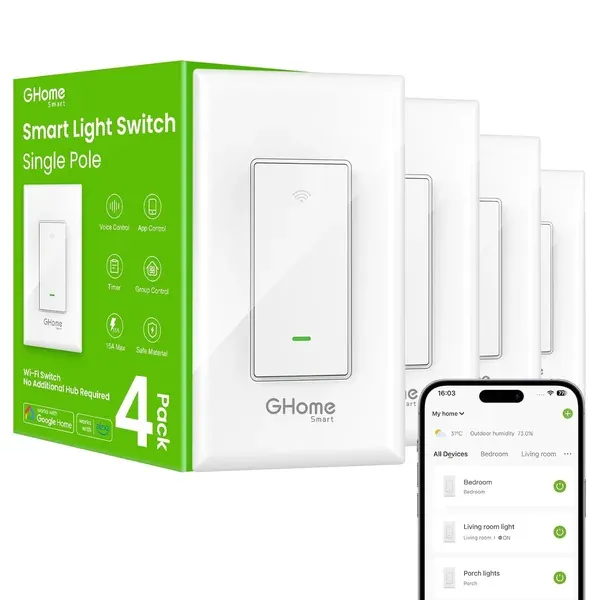
The GHome Smart SW5 is a single-pole, in-wall Wi-Fi light switch rated at 120V/60Hz, 15A, and up to 1,800W. It connects directly to a home's 2.4GHz Wi-Fi network — 5GHz is not supported — and requires no separate hub. According to the manufacturer, a neutral wire is required for installation, and the switch ships with four jumper wires. The manufacturer notes the switch is not compatible with smart bulbs.
Cover dimensions are 4.72" × 2.76" × 0.34" (120 × 70 × 8.7mm), with internal dimensions of 4.09"H × 1.77"W × 1.18"D (104 × 45 × 30mm), per the product listing. Control is handled through the GHome app (search for SW5), which the manufacturer says is available as a free download.
Build Quality and Safety
The SW5 carries both UL and FCC certifications, as stated in the product listing. The manufacturer describes this as confirming that "the quality of smart switches is assessed." Buyers looking for a baseline of independent safety verification will find those certifications present here — a meaningful bar for an in-wall electrical device.
The manufacturer also notes that firmware updates have been issued to improve feature stability, and recommends upgrading to at least version V1.1.3 via the in-app prompt after installation.
Features: Voice Control, Scheduling, and Remote Access
The SW5 integrates with Amazon Alexa and Google Assistant for hands-free voice commands. Through the GHome app, users can also create schedules tied to fixed times or to local sunrise/sunset — the listing gives a specific example of setting porch lights to turn on 30 minutes after sunset and off 25 minutes before sunrise. Group control is supported, allowing multiple switches across a home to be managed simultaneously from a single app view.
Published coverage on
huntergregory.com describes the voice control and app usability as "particularly impressive" and highlights that integration into existing homes is relatively straightforward compared with some competing products. The same coverage notes the DIY-friendly design as a differentiator.
Real-World Fit: Who It Suits, Who Should Skip
This switch is best suited to homeowners or renters (with permission to modify wiring) who have a standard single-pole switch controlling a conventional light fixture, an existing neutral wire in the junction box, and a 2.4GHz Wi-Fi network. The neutral wire requirement is a firm prerequisite — homes wired without one will need an electrician before this switch can be installed.
Because the SW5 is explicitly flagged as incompatible with smart bulbs, anyone building a mixed ecosystem of smart bulbs and smart switches should verify their configuration before purchasing. Users on a 5GHz-only network will also need to confirm their router broadcasts a 2.4GHz band.
Honest Limitations
A few limitations are worth flagging directly. First, a review published on
ghomesmart.com's own product page includes a customer account of persistent connectivity problems that were not resolved even after a warranty replacement — a signal that reliability experiences may vary. Second, a broader issue worth noting: T3 has reported (
t3.com) that Google Home has experienced recurring episodes of smart devices appearing offline in the app, with Google acknowledging the problem but not yet delivering a permanent fix at the time of that report. This is a platform-level issue rather than one specific to GHome, but it affects the Google Assistant integration that is a core selling point of this switch. Third, the lack of 5GHz support is a minor but real constraint for households whose routers require manual configuration to expose the 2.4GHz band.
The manufacturer's note to upgrade firmware after setup implies that out-of-box performance may not reflect the device's optimized state — a small but practical step buyers should plan for.
Category Context
Value-tier in-wall smart switches at this price point commonly omit hub-free Wi-Fi connectivity or limit scheduling granularity — the SW5's sunrise/sunset-relative scheduling and group control are features that typically appear at higher price points in this category. That said, the tradeoff common across this tier is that app ecosystems and cloud reliability are less mature than those of larger platform players, which the occasional connectivity report above may reflect.
Darrell Steward
1 Feb, 2021Brilliant
This is the best product that has ever been made. It is also one of the best items in the world right now. Definitely go for it.
Albert Flores
17 Oct, 2020Just WOW
It's good to use this product for development as it has very good performance, display quality and all other features.