What It Is and Key Specs
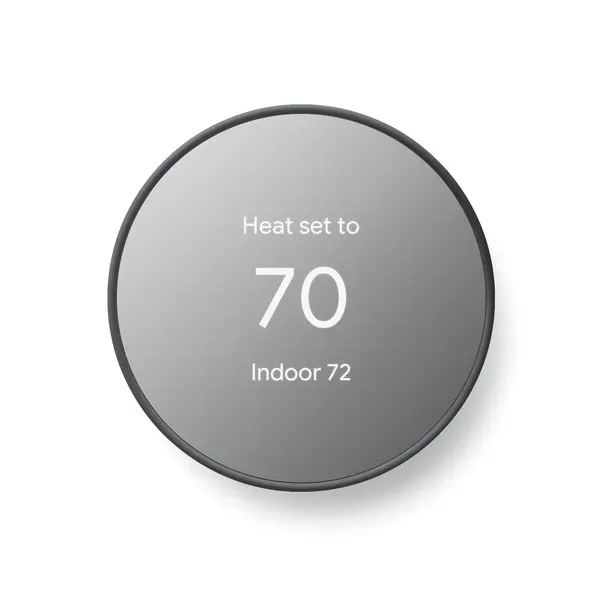
The Google Nest Thermostat is a programmable, Wi-Fi–connected smart thermostat available in a Charcoal finish. According to Google's official tech specs (
store.google.com), it works with most 24V heating and cooling systems — including furnaces, air conditioners, boilers, and heat pumps — with either forced-air or radiant delivery, and supports conventional systems with one stage of heating or cooling.
Connectivity is dual-band: 802.11b/g/n on 2.4 GHz and 802.11a/n on 5 GHz Wi-Fi, plus Bluetooth Low Energy for local communication. The thermostat is ENERGY STAR certified, and scheduling is handled through the Google Home app on Android or iPhone. Per Google's comparison page (
store.google.com/magazine/compare_thermostats), buyers can cross-reference this model against other Nest tiers — including the learning-capable models — before committing.
Build Quality and Safety
Based on published coverage from Popular Mechanics, the thermostat features a glossy glass finish and zero-latency physical controls, with reviewers noting it fits naturally into everyday living spaces. TechGearLab describes the design as minimalistic and round, and notes it was among the easier models to set up, with strong installation guidance from Google.
No CPSC recalls are on record for Google products of this type as of 2024-07-24, per the U.S. Consumer Product Safety Commission's SaferProducts.gov database.
Core Features: How They Work in Practice
The thermostat's standout behavioral feature is automatic setback: per the product listing, it turns itself down when occupants leave, avoiding energy waste in an empty home. The companion Savings Finder tool (in the Google Home app) analyzes the existing schedule and suggests further efficiency tweaks; Google also notes that users should check with their energy provider, as rebates may apply.
Remote control extends to any phone, laptop, or tablet for any household member. The listing also highlights HVAC monitoring, which sends alerts if the heating or cooling system behaves unexpectedly and surfaces maintenance reminders — a practical addition for homeowners who don't closely track system performance.
Voice control is supported through Google Assistant and any Matter-certified assistant, though a compatible smart device is required.
Real-World Fit: Who It Suits, Who Should Skip
This thermostat is well-suited to renters and homeowners with standard 24V HVAC systems who want remote scheduling and basic automation without the premium price of a learning thermostat.
Consumer Reports notes that the higher-tier Nest Learning Thermostat (4th gen) is the option that actively learns temperature preferences — shoppers who want fully autonomous scheduling adaptation should compare both models at
store.google.com/magazine/compare_thermostats before deciding.
Those in homes with heating-only, cooling-only, zone-controlled, or heat-pump systems should pay particular attention: Google's own listing and support documentation (
support.google.com/googlehome/answer/9235232) confirm that a C wire or compatible power accessory (such as the Nest Power Connector) may be required in these configurations. Google provides an online Nest Compatibility Checker on its support page, and using it before purchase is strongly recommended.
Honest Limitations
No product is without trade-offs, and published sources surface several worth noting:
- C wire dependency in some systems: Despite being designed to work without a C wire in most homes, certain system types — heat pumps, zone-controlled setups, heating- or cooling-only systems — may require one or the Nest Power Connector, per Google's own documentation. This can add an installation step or cost.
- No self-learning: Unlike the Nest Learning Thermostat, this model does not automatically learn and adapt to occupancy patterns on its own; scheduling is manual via the app, with Savings Finder offering suggestions rather than autonomous adjustments.
- Power and charging issues reported: Third-party troubleshooting sources (ars.com, comfortexpertsinc.com) flag that power delivery problems — often tied to missing C wire, clogged air filters affecting system cycles, or transformer irregularities — are among the more common field issues. Google's own support documentation acknowledges these scenarios and provides guidance.
- No lock feature: The product listing explicitly notes the lock feature is not included on this model, which may matter in households where restricting thermostat access is a priority.
- Voice control requires external hardware: Compatibility with Google Assistant and Matter-certified assistants is only active when a qualifying smart device is already present in the home.
Darrell Steward
1 Feb, 2021Brilliant
This is the best product that has ever been made. It is also one of the best items in the world right now. Definitely go for it.
Albert Flores
17 Oct, 2020Just WOW
It's good to use this product for development as it has very good performance, display quality and all other features.