What It Is and Key Specs
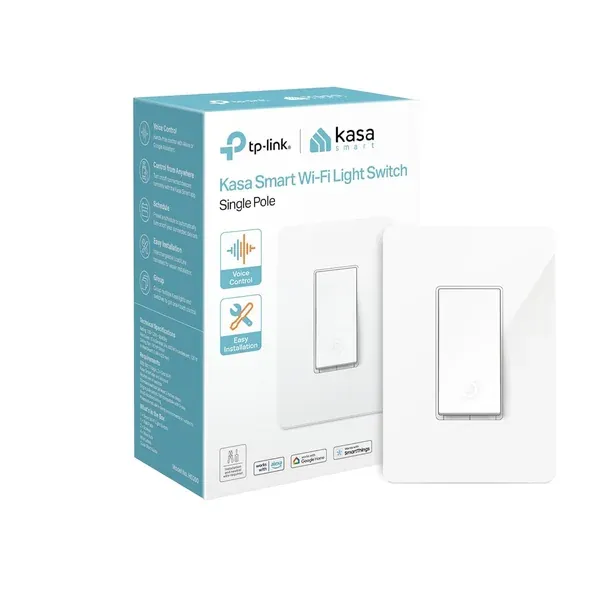
The Kasa HS200 is a single-pole smart light switch made by TP-Link's Kasa Smart division. It connects directly to a home's 2.4 GHz Wi-Fi network — no hub or bridge required — and is controlled through the Kasa or Tapo app on Android (5.0 or higher) or iOS (10 or higher). The switch operates on 100–120 VAC, 50/60 Hz, at 15 A, according to the operational guide published on Manuals+. Physical dimensions without the wall panel are 4.13 × 1.71 × 1.74 inches. It is white and designed for standard single-pole installations.
Voice control is supported through Amazon Alexa and Google Assistant, and the manufacturer notes compatibility with Microsoft Cortana as well. The switch does not currently support Apple HomeKit natively.
Build Quality and Safety
Published coverage from BrandGuides notes that the HS200's plastic body design feels somewhat lightweight compared to premium alternatives such as Lutron or Leviton. That said, build quality at this price tier is generally consistent with the category, and the trade-off is a lower entry price.
On the safety front, the HS200 carries UL certification, as stated in the manufacturer's listing. As of July 24, 2026, there are no CPSC recalls on record for Kasa products of this type, per the U.S. Consumer Product Safety Commission's SaferProducts.gov database.
Features and Day-to-Day Use
The Kasa app provides app-guided installation with step-by-step instructions, which lowers the barrier for users who are reasonably comfortable with basic home wiring. The manufacturer explicitly recommends consulting a licensed electrician for anyone unfamiliar with electrical work — worth taking seriously, as the JustAnswer forum thread on the HS200 highlights that reversed line and load wires are a common source of installation problems.
Once set up, the switch supports:
- Remote control from anywhere via the Kasa app
- Voice commands through Alexa or Google Assistant
- Scheduling with timer and countdown options
- Away mode, which randomly toggles the switch on and off to simulate occupancy
These are well-rounded features for an entry-level smart switch. The scheduling and away mode functions are particularly useful for households that want basic automation without investing in a broader smart home ecosystem.
Kasa states the brand is trusted by over 4 million users, and the switch is designed and developed in Silicon Valley.
Real-World Fit: Who It Suits, Who Should Skip
The HS200 is a strong fit for renters or homeowners who want reliable Wi-Fi-based light control in a standard single-pole setup, already have a 2.4 GHz network, and prefer a straightforward app-driven experience without committing to a proprietary hub.
Who may want to look elsewhere:
- Neutral wire is required. Older homes — particularly those built before the 1980s — often lack neutral wires at switch boxes. Buyers should confirm wiring before purchasing.
- No dimming capability. As noted in Family Handyman's coverage, the HS220 is the Kasa model to consider if dimming is a priority.
- Apple HomeKit users. The HS200 does not natively support HomeKit, so households built around Apple's ecosystem will need to look at alternatives.
- 5 GHz-only networks. The switch requires a 2.4 GHz band; dual-band routers typically work fine, but the 2.4 GHz band must be available and broadcast separately.
How It Compares in Its Category
BrandGuides' coverage draws a useful comparison: Lutron Caséta is better suited to larger homes and Apple HomeKit users, but it requires a hub and carries a higher price. The Kasa HS200, by contrast, is easier to set up and sits at a lower price point — a reasonable trade-off for users who don't need hub-based reliability or HomeKit support.
Honest Limitations
No product is without drawbacks, and the HS200 is no exception. The plastic construction is functional but not premium. The neutral wire requirement will exclude some older homes. The lack of dimming, Matter protocol support, or HomeKit compatibility narrows its appeal for users invested in specific ecosystems. And while app-guided installation is helpful, wiring errors are a real risk for first-timers — professional installation is worth considering.
Readers' aggregate ratings for the HS200 reflect broadly positive sentiment, though individual experiences with installation complexity vary.
Darrell Steward
1 Feb, 2021Brilliant
This is the best product that has ever been made. It is also one of the best items in the world right now. Definitely go for it.
Albert Flores
17 Oct, 2020Just WOW
It's good to use this product for development as it has very good performance, display quality and all other features.