What It Is and Key Specs
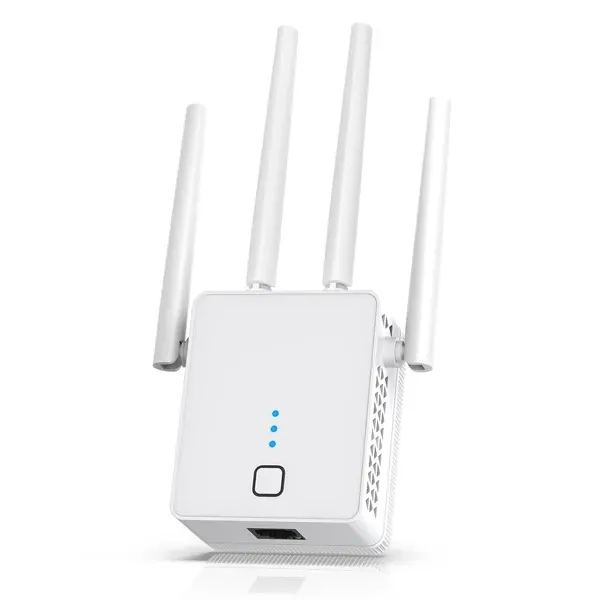
The Nonser WiFi Extender is a dual-band Wi-Fi repeater rated at a combined 1200Mbps — split across a 2.4GHz band and a 5GHz band. It ships with four external antennas, an Ethernet port for wired device connections, and support for three distinct operating modes: Wi-Fi repeater, access point (AP), and wired bridge via the Ethernet port.
According to the manufacturer's listing, the device is designed to support 105 or more simultaneous devices and claims a coverage footprint of up to 15,999 sq. Ft. Security is handled via WPA/WPA2 protocols, which are current baseline standards for home network protection.
Build Quality and Safety
The product listing does not provide detailed materials specifications or third-party certification details beyond the stated WPA/WPA2 security protocol support. As of July 24, 2026, there are no CPSC recalls on record for Wi-Fi products of this type, according to the U.S. Consumer Product Safety Commission's
saferproducts.gov database.
The four-antenna design is consistent with extenders in this class that aim to improve signal directionality and range, though antenna count alone does not guarantee real-world throughput.
Real-World Fit: Who It Suits and Who Should Skip It
Based on the manufacturer's feature set, this extender is aimed at users dealing with dead zones in larger homes or offices who want to avoid replacing their entire router setup. The three operating modes add practical flexibility: the AP mode, for instance, allows the device to create a fresh network access point when connected via Ethernet, which is useful for extending wired infrastructure. The included Ethernet port also means wired devices like smart TVs, gaming consoles, or desktop PCs can connect directly.
For users in smaller spaces — apartments or single-floor homes under 1,500 sq. Ft. — the device's broader feature set may be more than necessary. Published category guidance from sources like Wirecutter and Consumer Reports consistently notes that Wi-Fi extenders are best suited as a targeted fix for specific dead zones rather than a whole-home networking overhaul.
Users with Wi-Fi 6 routers looking to take full advantage of their router's capabilities should note that this extender operates on the older Wi-Fi 5 (802.11ac) standard based on the listed 1200Mbps dual-band specification. PCMag's category roundup highlights Wi-Fi 6 extenders — such as the TP-Link RE715X — as the current benchmark for pairing with modern routers, which is worth considering before purchasing.
How It Compares in the Category
At the 1200Mbps dual-band tier, this extender sits in a crowded and competitive segment. Consumer Reports and TechGearLab both conduct lab-based throughput testing on extenders at near and far ranges from the router, and their reviews consistently show that real-world speeds in this class vary significantly by environment, wall construction, and router compatibility — factors no listing specification can account for.
The 15,999 sq. Ft. Coverage claim is notably large for a device at this specification level. Industry reviewers, including those at Wirecutter, generally caution that manufacturer coverage estimates are measured under ideal, open-air conditions and rarely reflect performance in homes with multiple walls, floors, or interference sources. Treating coverage claims in this category as best-case figures rather than guaranteed outcomes is a reasonable and widely-advised approach.
Honest Limitations
Several limitations are worth flagging before purchase:
- Coverage figures are optimistic by nature. The 15,999 sq. Ft. Claim should be understood as a ceiling under ideal conditions. Real-world performance in multi-story or densely furnished homes will differ.
- 1200Mbps is a combined theoretical maximum. Actual usable throughput on either band will be lower, as is standard for repeaters of this type.
- Wi-Fi 5 standard. Users with Wi-Fi 6 routers will not get Wi-Fi 6 performance through this extender.
- Extender-class limitations apply broadly. As noted in published troubleshooting resources from NETGEAR, TP-Link community forums, and expert networking Q&A sources, extenders as a category can be sensitive to placement, firmware state, and distance from the primary router. Periodic connectivity drops are a documented, category-wide issue — not unique to any single brand — and firmware updates and careful placement are the most commonly recommended mitigations.
- No third-party independent test data for this specific model was identified in available sources, meaning performance claims rest solely on manufacturer specifications.
Darrell Steward
1 Feb, 2021Brilliant
This is the best product that has ever been made. It is also one of the best items in the world right now. Definitely go for it.
Albert Flores
17 Oct, 2020Just WOW
It's good to use this product for development as it has very good performance, display quality and all other features.